Onboarding Hub - Step 20 Link to other Transvirtual businesses
Link Your Account to other Transvirtual Businesses
This article explains how to link Transvirtual accounts and the purpose of doing so.
Page URL:
How To
To begin, navigate to the above Page URL which is located under Transport > Configuration and Setup > Card Files (Customers/Suppliers/Staff):
Transvirtual allows accounts to be linked for the purpose of data transmission. Within each agent (or customer card), a link can be established so that when consignments are assigned to the linked agent, Transvirtual automatically pushes and replicates the consignment data to the linked agent’s account. The agent can then action the consignment, with status updates flowing back to the originating consignment in the linked customer account. This functions as an integration using Transvirtual’s built-in account linking capability.
Open the agent card file that requires linking and click Request Link with Agents TransVirtual:

Enter the TransVirtual number for the agent and click Request; this can be obtained from the agent.

The Transvirtual number of each account is shown on the landing page - click the logo top left, then TransVirtual # under System Information:
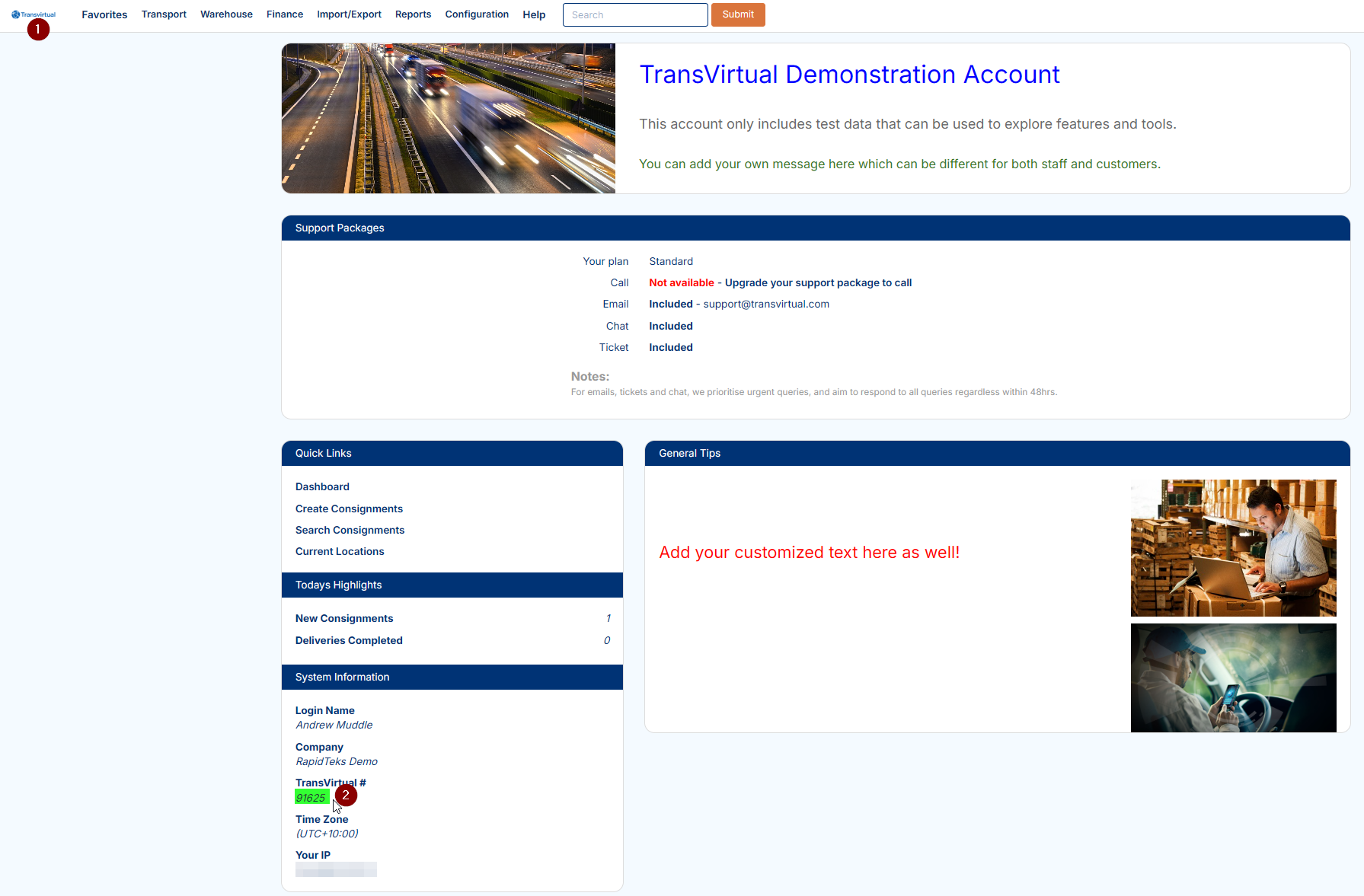
Once requested, a message will show as below:
This indicates the agent is yet to accept the link request.
Accepting a Link Request
To accept a link request from another Transvirtual account, click the dropdown arrow for the login name at the top right:
Click the notification to enter the below page:
If the requester already exists as a customer in the account, use the top dropdown to select the relevant customer card to link, then click Submit:
Alternatively, if the requester does not yet have a customer card, click Accept Request and Create a New Customer Card:
This accepts the link while simultaneously creating a customer card for the requesting customer.
If the link is not needed, click Reject Request:
Once the request has been accepted, the link will be established and a Transvirtual number will appear against the relevant card file:
FAQs
Q: Why can't I see any notifications of link requests?
In order to see notifications such as link requests, click on the dropdown arrow near login name top right and select Profile:
Enable the below Visible Alerts:
Q: How do I setup an account link with my agent if I have multiple accounts with them?
A Transvirtual account link is a one-to-one relationship, meaning two Transvirtual accounts can only be linked to each other once. If a business arrangement requires a linked customer to have multiple customer accounts with the same linked agent, a standard Transvirtual account link is no longer suitable. In this scenario, an API integration should be used instead. While functionally similar, an API integration uses export rules to transfer data back and forth between accounts, providing greater control over the data exchanged and supporting multiple logical “links” between the same two accounts. Reach out to support@transvirtual.com for setup help - please note this will incur an integration charge.
Related Articles + Videos
Please see below links that provide more information on the content of this help article:
- https://support.transvirtual.com/portal/en/kb/articles/linking-transvirtual-accounts-28-7-2024
- https://www.loom.com/share/ca774c36b23a4e49b059bcad7e50fcc3
Related Articles
Onboarding Hub - Step 21 and 22 Transport Integrations
Transport Integrations (EDI + API) This article provides a list of common integrations previously requested and implemented for Transvirtual account holders. How To EDI Integration EDI integrations, which use Transvirtual’s Electronic Data ...Onboarding Hub - Step 15 Driver Alerts [add later/phase 2]
Mobile Driver Alerts This article explains how to configure mobile alerts and their use in Transvirtual. Page URL: Mobile Alerts How To To begin, navigate to the above Page URL which is located under Configuration > General > Mobile Driver Alerts: ...Onboarding Hub - Step 30 Customer Tracking Options
Tracking Consignment for Customers This article will explain how to configure tracking notifications for customers. Page URL: Export Consignment Status Updates Export PODs How To This is largely explained in the workflows listed here: Link Further ...Onboarding Hub - Step 10 Barcodes [add later/phase 2]
Barcode Formats This article will explain how to configure Barcode Formats and detail their purpose. Page URL: Barcode format rules How To To begin, navigate to the above Page URL which is located under Configuration > General > Barcode Formats: This ...Onboarding Hub - Step 16 Customer Notifications [to complicated for new users replacing with simple option - leave to phase 2]
Customer Tracking Notifications (email/sms) This article outlines the setup of three common export rules used to notify customers of delivery updates: a status export for On Delivery notifications, a status export for Delivered notifications, and a ...